AP automation for QuickBooks
in one click, inside Gmail
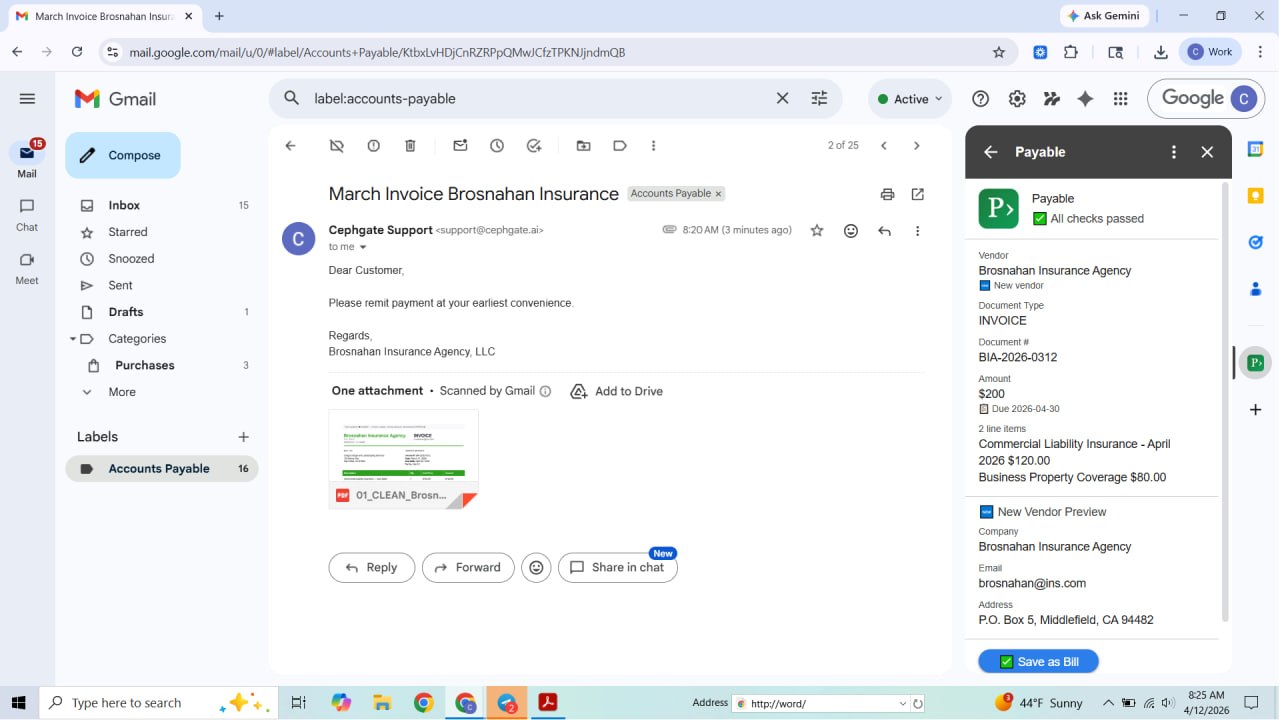
AI invoice processing and receipt capture for QuickBooks Online — right inside Gmail. Payable doesn't just scan your invoices and receipts; it understands them: vendors fuzzy-matched to QuickBooks, invoice numbers cross-checked for duplicates, amounts verified. Save as a bill or expense in one click.
Free to install · 5 invoices/month free, no card required
Coming from Bill.com? See how Payable compares →
Payable connects to QuickBooks Online and meets Intuit's verified standards for quality and performance. Built and maintained to the Intuit platform's ongoing technical requirements.
Real screenshots from the Payable add-on inside Gmail.
How Payable works
Three steps. No setup. No manual data entry.
Open an invoice email
Open any email with an invoice or receipt attachment in Gmail. Payable activates automatically in the sidebar.
AI extracts everything
Payable reads the PDF, image, or Word doc — extracting vendor, amount, due date, PO number, and more. New vendors are created automatically.
Save to QuickBooks
Click Save as Bill or Record Expense. Done. The transaction is in QuickBooks with the original document attached.
Why bookkeepers are switching
OCR extracts text. AI extracts meaning. That changes everything.
Duplicate detection that actually works
We check invoice numbers — not just dates and amounts. A misread date or a penny difference won’t let a duplicate slip through. Payable catches what OCR misses.
Vendor matching you don’t have to fix
“ABC Corp” vs “ABC Corporation” — same company. Payable gets that. No duplicate contacts clogging your vendor list. New vendors are created automatically when needed.
Reads what OCR can’t
Unusual fonts. Scanned receipts at odd angles. Multi-page PDFs. Handwritten notes. Payable handles what template-based OCR tools choke on.
Bills or Expenses — we know the difference
Invoice with a due date? That’s a Bill. Paid receipt? That’s an Expense. Payable routes each to the right QuickBooks transaction type automatically.
Flags risks before they hit your books
PO mismatches, new vendors, unusually large amounts, missing data — Payable surfaces concerns before you save, not after your books are wrong.
Lives in Gmail. Zero new apps.
No separate dashboard. No new login. No uploading files to another website. Payable works right in your Gmail sidebar, connected to your existing QuickBooks Online account.
Simple pricing
Start free. Upgrade when you need more.
- ✓PDF & image extraction
- ✓QuickBooks Bills & Expenses
- ✓New vendor auto-creation
- ✓Duplicate detection
- ✓Save attachment to QuickBooks
- ✓PDF & image extraction
- ✓QuickBooks Bills & Expenses
- ✓New vendor auto-creation
- ✓Duplicate detection
- ✓Save attachment to QuickBooks
- ✓Class & project tracking
- ✓Priority support
- ✓PDF & image extraction
- ✓QuickBooks Bills & Expenses
- ✓New vendor auto-creation
- ✓Duplicate detection
- ✓Save attachment to QuickBooks
- ✓Class & project tracking
- ✓Priority support
- ✓Everything in Business
- ✓Multi-user / team accounts
- ✓Custom integrations
- ✓Dedicated support
Upgrades are managed inside the Payable add-on in Gmail.
Two steps to get up and running
Payable works inside Gmail — no new app to download, no separate dashboard to learn.
Free to install · Works in your existing Gmail + QuickBooks
Frequently asked questions
Everything you need to know before you install.
Does Payable work with QuickBooks Desktop?
Payable works with QuickBooks Online only. It does not support QuickBooks Desktop or QuickBooks Self-Employed.
What file types does Payable support?
Payable reads PDF invoices, image attachments (JPG, PNG), and Word documents (DOCX). It handles scanned receipts, multi-page PDFs, and documents with unusual layouts.
How does Payable detect invoices automatically in Gmail?
When you open an email in Gmail, Payable scans the attachments for vendor invoices and receipts. If it finds one, it activates in the Gmail sidebar and extracts the key details using AI — no clicking required.
Is my QuickBooks data secure?
Yes. Payable uses OAuth 2.0 to connect to QuickBooks Online — we never store your QuickBooks password. All data is encrypted in transit. Payable is a verified Google Workspace Add-on and a recognized member of the Intuit App Partner Program.
What is the difference between a Bill and an Expense in QuickBooks?
A Bill is a vendor invoice with a future due date — something you owe but haven't paid yet. An Expense is a receipt for something already paid. Payable automatically routes each document to the correct type.
Can Payable create new vendors in QuickBooks automatically?
Yes. When Payable detects a vendor that doesn't exist in QuickBooks, it creates the new vendor automatically before saving the bill or expense.
How does Payable prevent duplicate invoices?
Payable checks the invoice number against existing QuickBooks transactions for the same vendor — catching duplicates even when dates or amounts were slightly misread, a common failure for OCR-only tools.